A pocket full of TaskPaper

Requires iOS 17.0 or later
Last updated: 2026-09-08

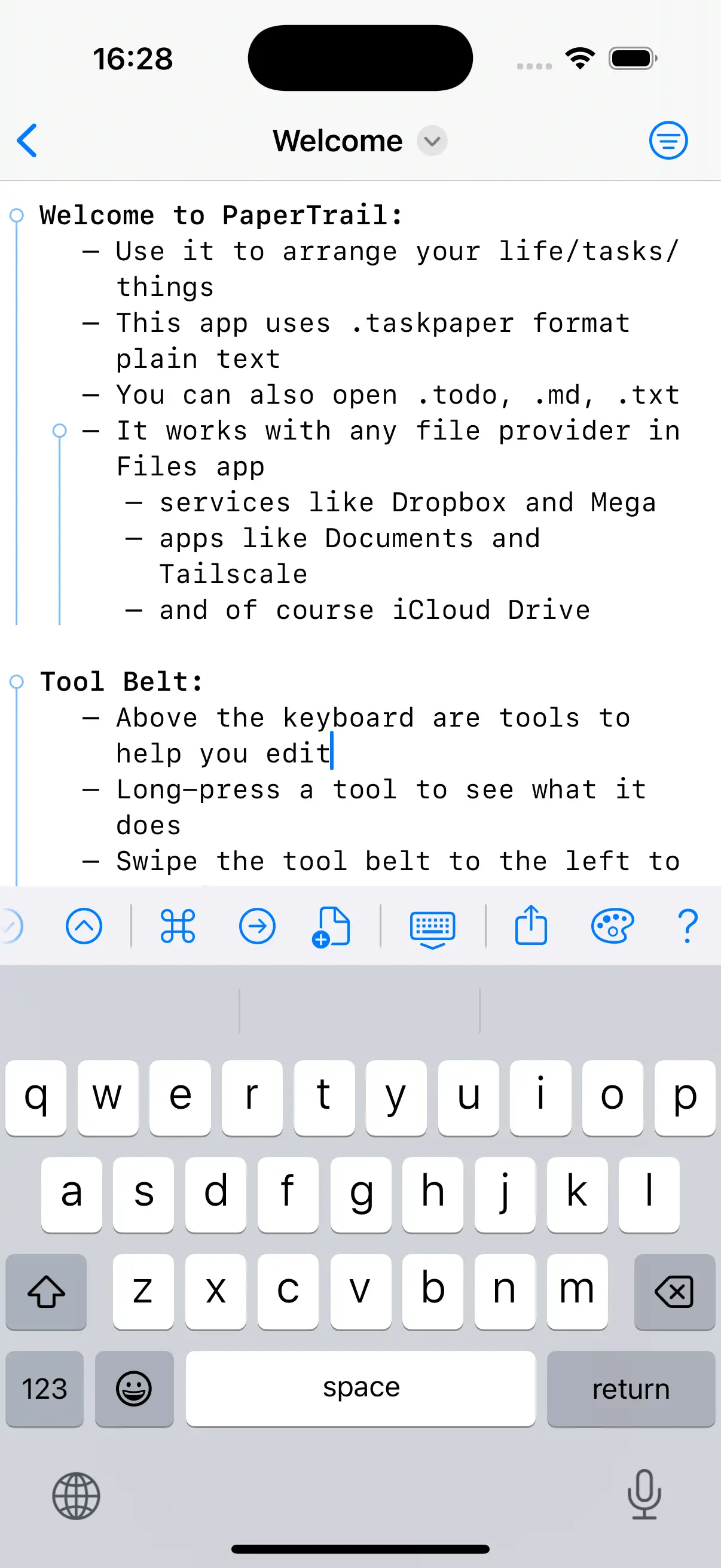
PaperTrail brings full TaskPaper editing to iOS/iPadOS. TaskPaper is plain text productivity—simple, fast, flexible.
Projects, tasks, notes, and tags. Filter, search, and archive. All in plain text files you can sync via iCloud and edit in TaskPaper app on your Mac.
-
TaskPaper FormatSupports .taskpaper, .todo, .txt, .md, .opml, .bike files
-
Fold & FocusCollapse, fold to depth level, and focus into any subtree
-
SearchFull query language with comprehensive matching
-
Tag SystemSimple tags, values, dates, progress, and cost tracking
-
Smart FiltersFilter by project, tag, or value with edge-swipe
-
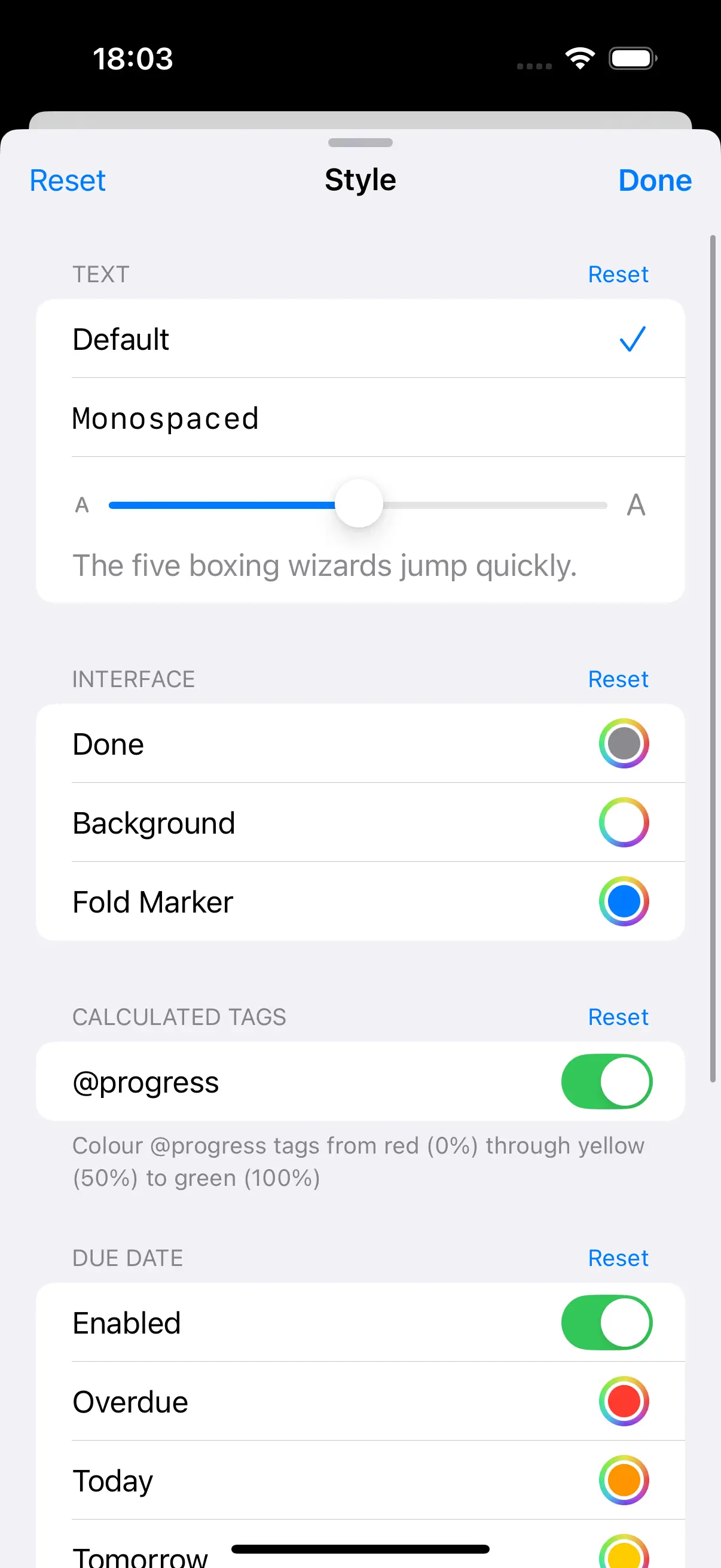
StyleSelect font, text size, and colour for dark/light modes
-
TemplatesBuilt-in and custom templates for new files
-
Keyboard & Gestures50+ shortcuts and edge swipes for power workflow
-
Thoroughly iOSDark Mode, Dynamic Type, VoiceOver, Shortcuts & more
Text Editing
- Supports: Tasks (bulleted), Projects (headers), Notes (plain)
- Toggle between task, note, and project
- Smart bullet insertion on Return
- Context-aware indentation
- Smart capitalisation of the first word after a bullet; autocorrect off by default, toggle from the Command Palette
- Mid-line Return preserves indent and continuation bullet
- Newline above, below, or without indent for breaking out of nested lists
- Upper case / lower case selection transforms
- Dedicated note insertion preserves indentation without adding a bullet
- Insert portable Markdown link to other files
- Multi-line editing, indent/outdent, move up/down
- Branch indent/outdent and move that keep descendants attached
- Long-press the tool Indent/Outdent buttons to operate on the whole branch
- New! Swipe right/left on a line to indent/outdent its branch—multi-line selections swipe as a block; on by default, toggle in Settings
- New! Or switch swipe to focus in/out instead—the two swipe gestures are mutually exclusive, chosen in Settings
- TaskPaper-style selection: word, sentence, paragraph, branch
- Long-press tool Move Up/Down to Move to Previous/Next Section or Move Branch Up/Down
- Move current branch—or every branch in selection—into another project
- Group Lines wraps the current branch in a new project header
- Duplicate the current line or selection
- Delete the current line or selection, together with their child items
- Reformat indentation for flat or mixed documents
- Sort top-level projects by name, due date, task count, or priority
- Full undo/redo with named action titles
Task Management
- Mark done/incomplete with
@donetag - Optional completion date:
@done(YYYY-MM-DD) - Strikethrough for completed tasks
- Toggle with spacebar or tap gesture
- Hierarchical nesting under projects
Project Management
- Nested sub-projects with hierarchical sidebar
- Collapsible projects—fold/unfold to focus on what matters
- Fold state persists across sessions
- Project filtering with base indentation stripped for sub-projects
- Duplicate project names distinguished by position
- Non-indented documents handled correctly
- Archive completed items to dedicated section, newest first
- Archived items maintain parent-child relationships
- Archive Done in Branch—scoped archive that only sweeps the caret’s subtree
Tag System
- Simple tags:
@tagname - Valued tags:
@tagname(value1, value2) - Date tags:
@due(YYYY-MM-DD),@start(YYYY-MM-DD) - Time tags:
@alarm(HH:MM),@alarm(YYYY-MM-DD HH:MM) - Predefined:
@today,@done,@flagged,@fix,@todo,@high,@low,@for(name),@call(name) @progress(n)—auto-calculated completion percentage from child task@donestates@cost(n)—manual cost value on leaf tasks@cost(method=n)—auto-calculated aggregate (sum/count/ave/min/max) from child@costvalues- Toggle Due / Toggle Start for quick add/remove of bare tags
- Tag picker showing existing document tags
- New! Tag autocomplete: type
@for a caret-anchored list of document and built-in tags, ranked most-used first - Prevents duplicate tags with smart whitespace cleanup
Folding
- Tap fold indicators to collapse/expand sections
- Drag fold indicators to move complete branches—horizontal position controls indent
⌘.to fold/unfold the current line⌘9/⌘0to collapse/expand the current item⌥⌘9/⌥⌘0to recursively collapse/expand the current item and all descendants- Fold to Level—collapse all items to depth 1–5
- Fold one level at a time from the keyboard with
⌃⌘9/⌃⌘0(or⇧⌘9/⇧⌘0), including inside a focused view - Expand All to clear all folds
- Persistent fold state saved and restored per file
- Persistent sidebar project tree—per-document expand/collapse state
- Bundled Guide sample opens fully collapsed on first open
- Large, mostly-folded documents open already collapsed at their true height, with no visible shrink into place
Node Focus
- Focus into any project, task, or note to edit its subtree in isolation
- Focus In drills deeper; Focus Out steps back to the direct parent, then to View All
- Focus Reveal shows the subtree even when ancestors are folded, preserving inner folds
- Focus context bar shows the current breadcrumb trail with Focus Out and View All actions
- Focus-aware insertion: Return at the focused root inserts as a child, not an outside sibling
- Left-edge swipe gesture to focus deeper; swipe back to step out
Search & Filtering
- Full query language: text matching, tag queries, boolean logic, path navigation, set operations
[w]for word-boundary matching—car [w]matches “car” but not “card”[m]for morphological matching—run [m]matches “running”~/[~]for semantic search—~groceriesmatches “supermarket”- Combinable with
[s]for case-sensitive variants - Search scoped to current focused subtree (
⌘F) or full document (⇧⌘F) - Native find commands: Find & Replace, Find Next, Find Previous, Refresh, End Search
- Pull down from top of editor to reveal search bar, even while editing
- Search Tree toggle to include descendants of matching items with parent context (remembers last-used state)
- Built-in syntax reference sheet
- Learn the full syntax in the TaskPaper Guide (archived copy)
- Saved searches stored in-document and shown in sidebar
- Built-in Today and Not Done searches
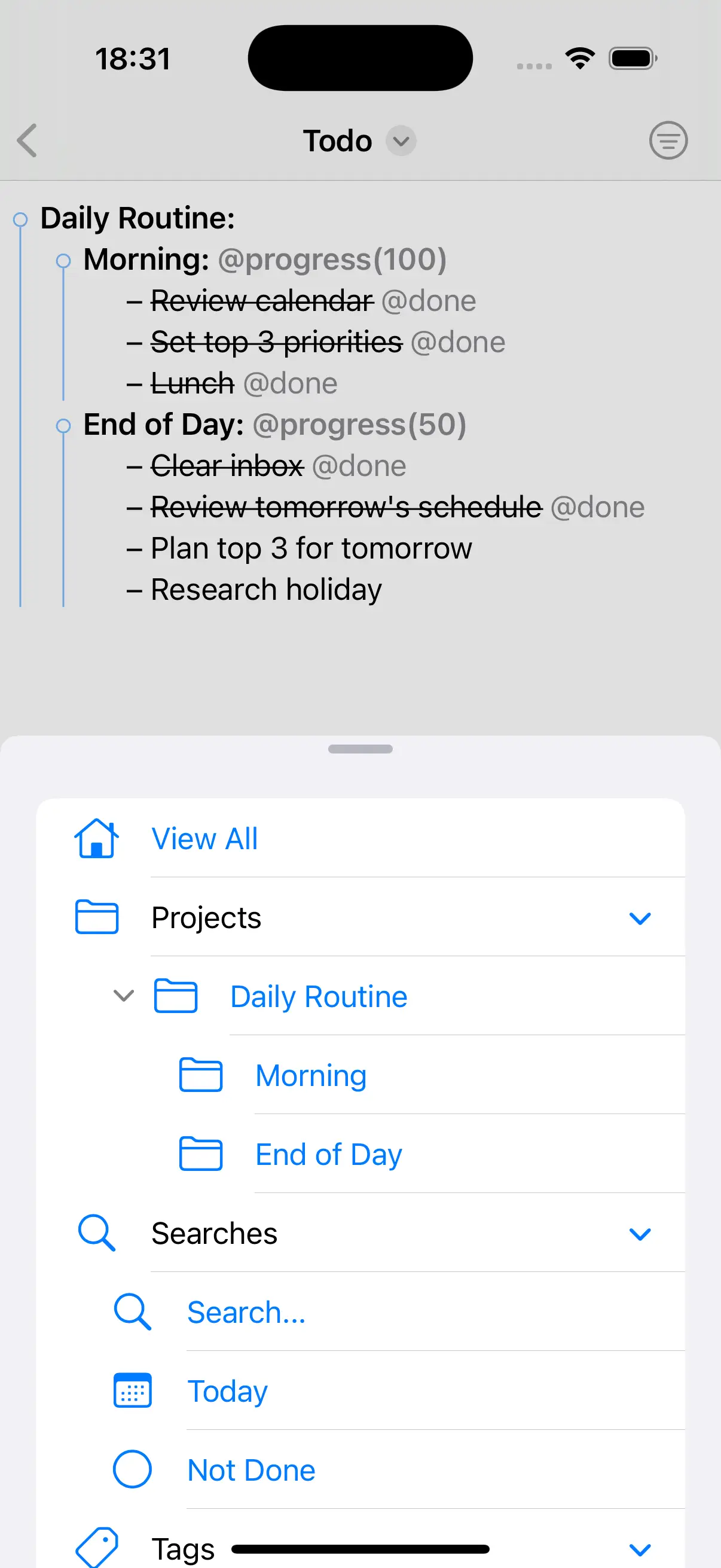
- Sidebar inspector with collapsible Projects, Searches, and Tags sections
- Sidebar keyboard controls to hide it or show it with all sections expanded
- Collapsible filter panel with nested project tree
- Right-edge swipe to open/close the filter panel
- iPad filter sidebar sits side-by-side with the editor and stays open across selections, like a contents list
- Filter by project, tag, or tag value
- Tap a tag in the editor to filter by it
- Edit directly within filtered views
- Filtered aggregate updates:
@cost(sum=…)recomputes from the visible hierarchy - Long-press to cancel active filter
- Dynamic tag index auto-built from document
Natural Date Parsing
- ISO 8601 format
- Keywords: today, tomorrow, next week, next month
- Month/day: January 15, Dec 25
- Time: 6 am, 3:15 pm, 16:15
- Duration: +45 minutes, +1 week
- Combined: tomorrow 9am, next Friday +1 hour
- Date only, date and time, or time only pickers
- Inline calendar picker
Alarms & Reminders
- Set alarms with
@alarm(…)tag - Date & time, date only, or time only
- Creates iOS Reminders automatically
- Edit or clear alarms
- Removes reminders when tags deleted
- Import an existing Reminders list as a project in one step
Colour By
- Colour lines by priority, outline level, or due date proximity
- New! Priority: custom colours for levels 1–5;
@highand@lowshare the highest and lowest - Outline level: custom colours for depths 1–5
- Due date: overdue (red), today (orange), tomorrow (yellow), this week (green), later (blue)
- New! One toggle tints the built-in marker tags—
@today,@flagged,@fix,@todo,@start—with curated colours - Toggle each mode on/off with colour pickers in settings
- Style settings apply immediately while the sheet is open, including swipe-to-dismiss
- Runs after default styling; skips
@donelines
Text Styling
- Bold font for project headers
- Italic styling for notes
- New! Strikethrough for completed tasks, or dim them in the Done colour with Toggle Strikethrough
- Coloured highlighting for
@tags, with an optional toggle for curated built-in marker colours @progresstags coloured based on percentage- Link detection for all types of URLs
- Hanging indent for task bullets
- Default or monospaced font
- Dynamic Type support for larger text size
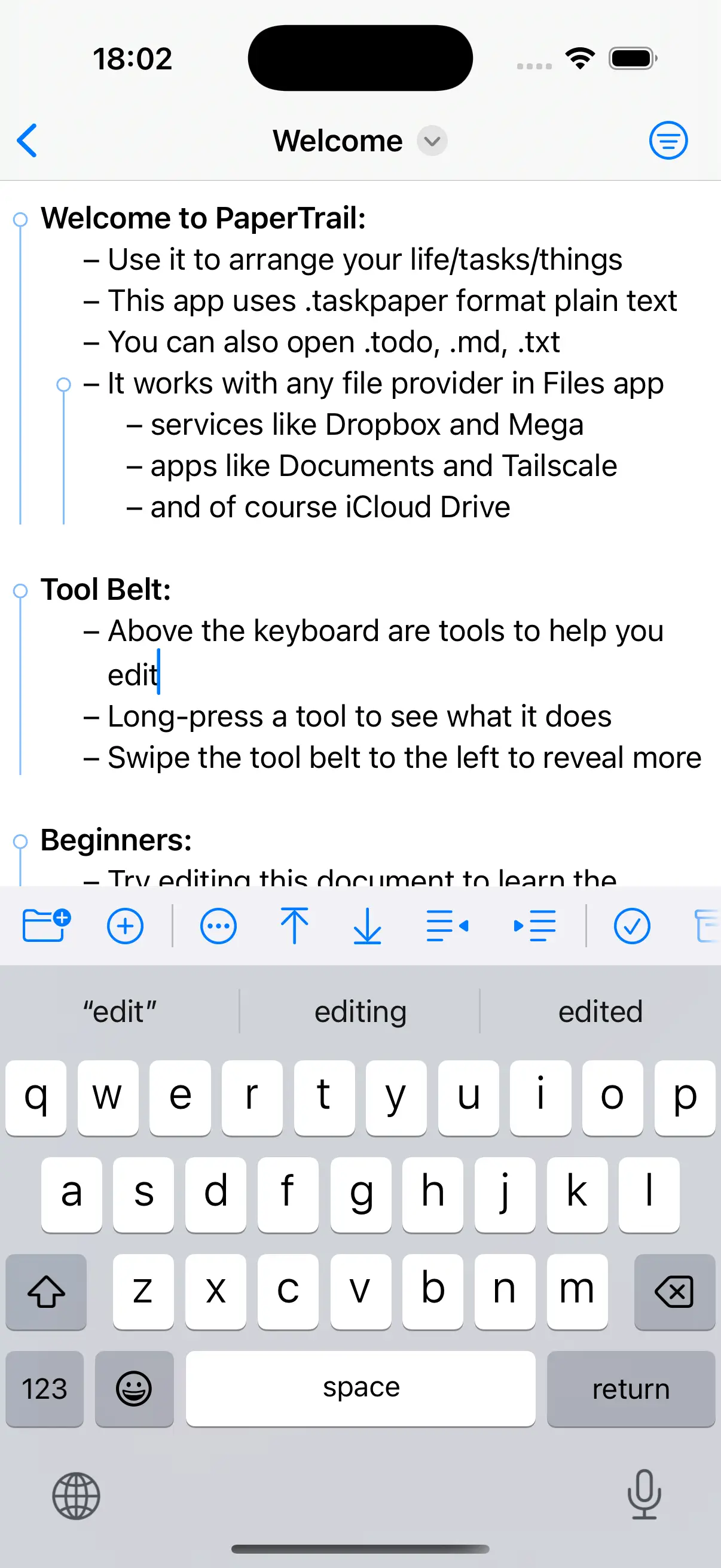
Tool Belt
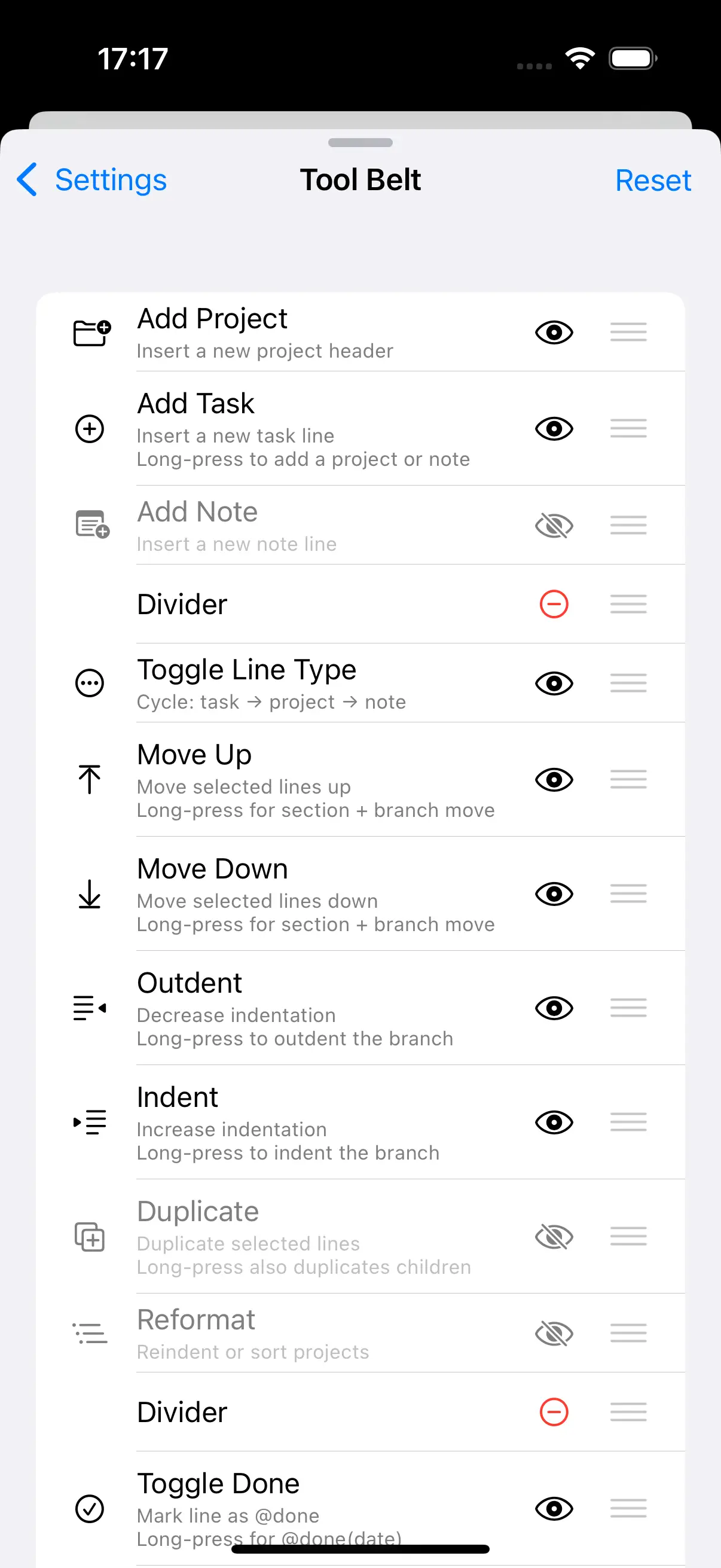
- Insert project/task, toggle line type
- Optional add-note button (hidden by default)
- Toggle done, archive done items
- Long-press done for
@done(…)with date - Inline date picker, priority selection, alarm toggle
- Flagged toggle,
@forperson assignment,@callphone reminder - Tag picker, indent/outdent, move up/down, with long-press for branch only
@progresstoggle—auto-calculated from children@costmenu—sum/count/ave/min/max aggregation- Fold to Level menu—collapse to depth 1–5, expand all
- Colour By settings—priority, outline level, due date
- Reformat menu: reindent, sort projects
- Settings tool is pinned—always reachable—and opens the Settings panel
- Customise the tool belt from Settings ▸ Tool Belt: reorder, add or remove dividers, and hide any tool
- Fade edges indicate more buttons when scrollable
- Buttons shown filled when they are affecting editor state
- Long-press any button for alternate function or tooltip
- Many advanced power-user features hidden by default
- Long-press the Settings tool to generate an anonymised debug report—document text is word-substituted, with app, OS, and device info attached
Settings
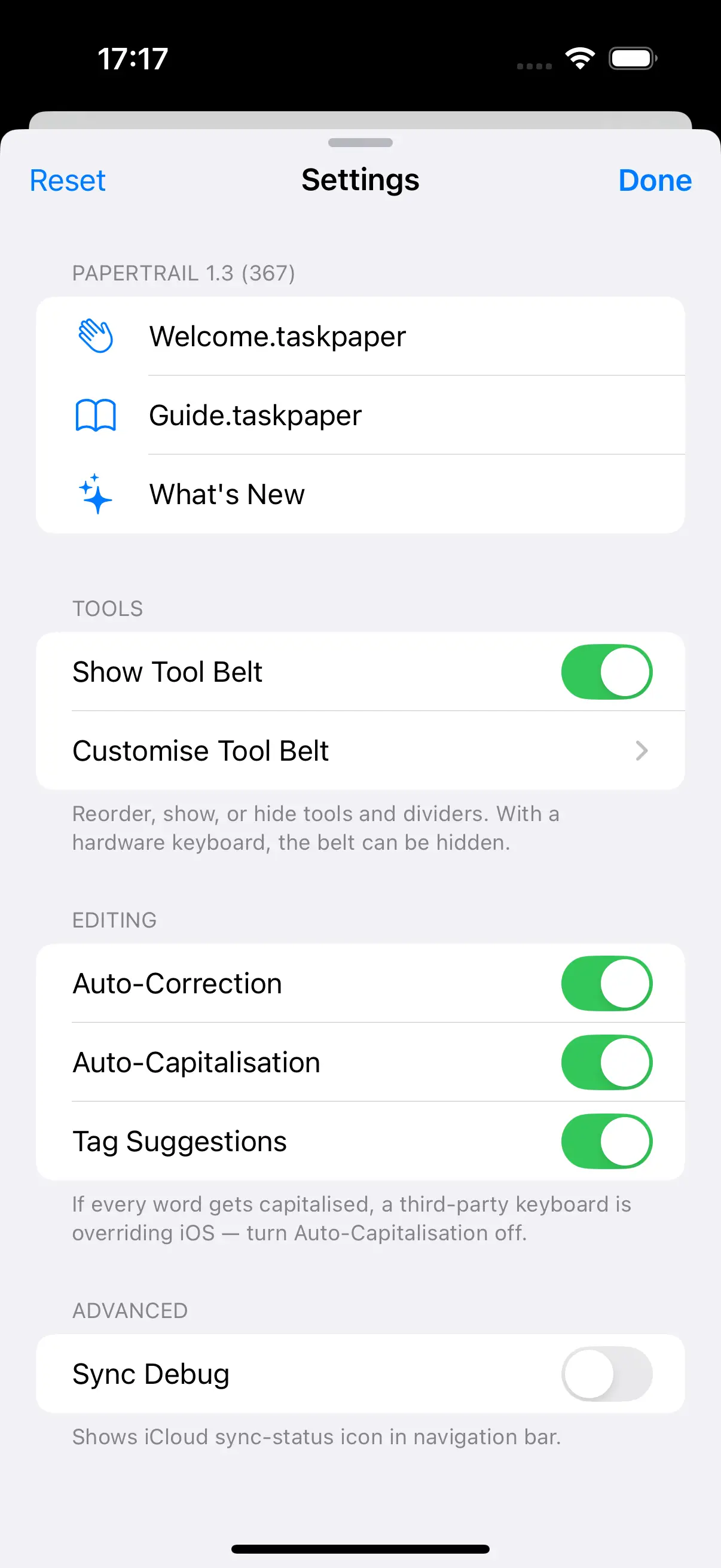
- New! A single Settings panel gathers preferences into Help & About, Tools, Editing, and Advanced sections—backed by the same command system as the keyboard shortcuts
- Help & About: open the Welcome and Guide samples, or the What’s New sheet
- Tools: toggle panel side and tool belt visibility, and open the Tool Belt customiser
- Editing: toggle auto-correction, auto-capitalisation, tag suggestions, and swipe to indent or focus
- Advanced: toggle the sync debug overlay
- Style and Settings open as full-height drawers—docked to the side on iPad, a large sheet on iPhone
- Changelog command opens the app’s online changelog
Command Palette
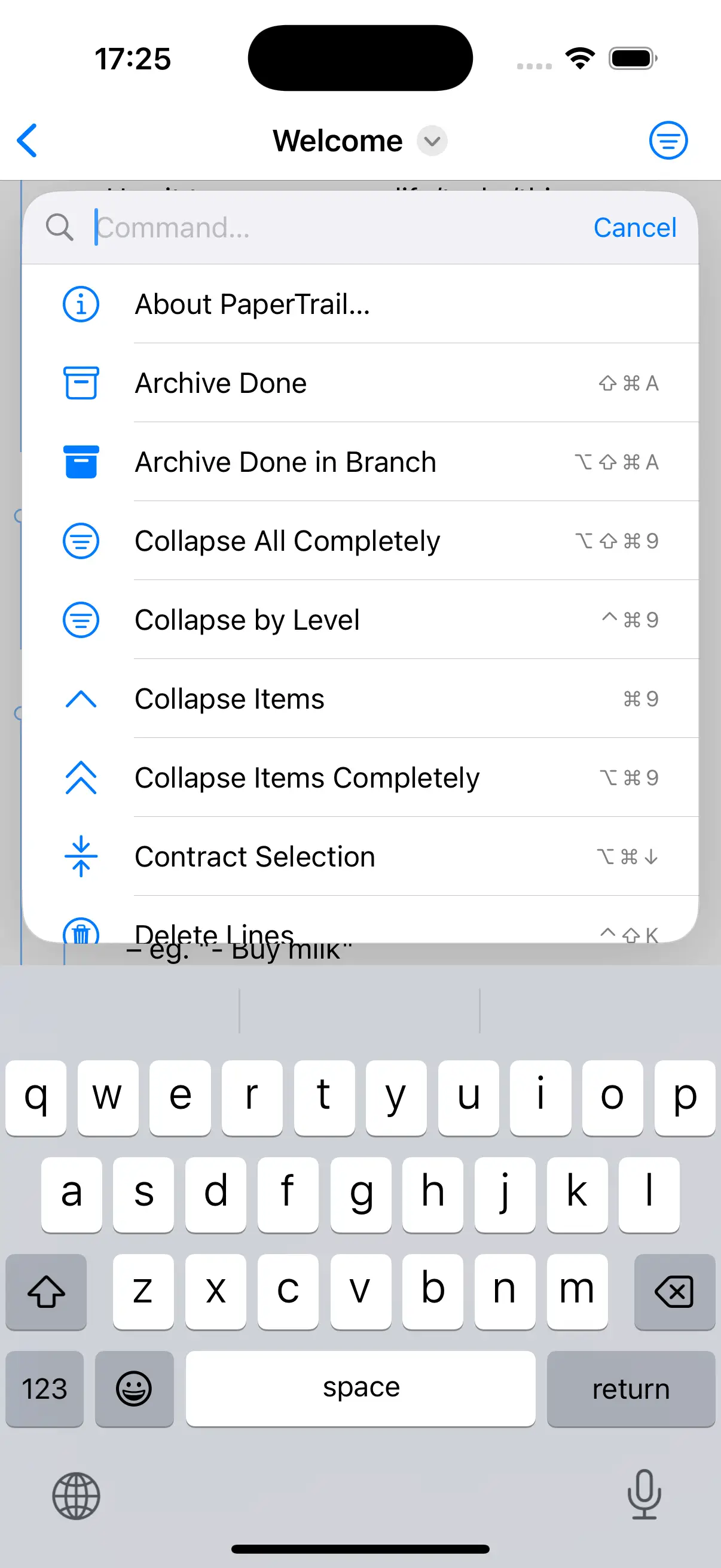
- Choose Command (
⇧⌘P): every editor command, alphabetised, with shortcuts - Go to Anything (
⌘P): jump to projects, saved searches, and tags - Go to Project (
⌥⌘P): filtered to projects only - Go to Search (
⌃⌘P): filtered to saved searches only - Searchable, keyboard-navigable
Export
- Choose a format from the tool belt: HTML presentation, OPML outline, or Bike outline
- Export documents as interactive HTML slide presentations
- Four themes: Light (White), Dark (Black), Keynote (Gradient), Pastels (Post-it notes)
- Keyboard controls for changing theme, toggling progress bar, page navigation
- Each top-level project becomes a landscape slide
- Updated Export back out as an OPML outline for use in other outliners—tags emit as Bike-style
data-NAMEattributes, with ids and row types preserved, so done state, tags, and formatting round-trip into Bike - New! Export directly to Bike’s native
.bikeformat—hierarchy, row types, ids, tags, links, and inline formatting all restored, so an imported Bike document returns to Bike without the OPML step - Each export first confirms what the format can’t represent, so nothing is lost silently
- Share via standard iOS share sheet
Document Management
- TaskPaper (.taskpaper, .todo), text (.txt), Markdown (.md), OPML (.opml), and Bike (.bike)
- New! OPML import converts outlines into TaskPaper files, warning when attributes or embedded HTML can’t be carried across
- New! Bike import—both Bike 1.x and the Bike 2.0 beta—maps headings, tasks, notes, row types, and row attributes (including done state) to TaskPaper, preserving inline formatting and links as Markdown so it round-trips back into Bike
- New! Edit
.bikeand.opmlfiles in place—they open as TaskPaper and are written back in their own format on save, with no separate export step - New! Tap a
bike://row link to jump straight to that row in the document; links into other documents hand off to Bike - Import a Reminders list as a project—dates, alarms, priority, and flags map to tags
- Quick capture from Shortcuts, Siri, widgets, Action Button—without opening the app
- Planning shortcuts: Open in Today, Random Next Task, or Morning Brief
- Welcome and Guide sample documents bundled for first-time users, placed in iCloud when available
- Eight built-in templates: Content Creation, Daily Routine, Event Planning, Meeting Notes, Packing List, Shopping List, Software Project, Weekly Planner
- Custom templates loaded from a
Templates/folder in Documents - Easily work with files containing many 1000s of lines
- Full Files app integration for opening, saving, organising
- iCloud sync through Files app—quiet in the background, with status icon
- iPadOS menu bar with Item, Tag, Outline, View, and Palette menus
- Auto-save on each change and on document close
- Automatic iCloud/Files conflict resolution—winning version reloads, edits are preserved
- Persistent cursor position restored when reopening a file
Shortcuts, Siri & Spotlight
- App Intents for Open Most Recent Document, Open Document (by name), and Import Reminders List
- Quick capture intents: append a task, note, Inbox task, clipboard text, or web link without opening the editor
- Planning intents: Open in Today, Random Next Task, and Morning Brief (today’s, overdue, Inbox, and open tasks)
- New! Find & update intents: Find Items runs a query, then Mark Item Done or Set Tag on Item; Find Projects, Append Task to Project, and Open Search drive per-project automations
- Available from Shortcuts, Siri, the Action Button, lock-screen widgets, and Spotlight
- Spotlight Suggestions: recent documents on lock screen, Spotlight, and keyboard bar
- Open specific or most recent document from a Shortcuts widget
Thoroughly iOS
- Dark Mode follows system appearance
- Dynamic Type for adjustable text size
- VoiceOver labels and rotor support
- Shortcuts, Siri, Action Button, and Spotlight via App Intents
- Files app integration for opening, saving, and organising
- iCloud sync through Files
- iOS Reminders two-way integration
- Lock-screen widgets and keyboard suggestion bar entries
- Standard iOS share sheet for exports and debug reports
Onboarding
- Welcome and Guide samples installed on first launch
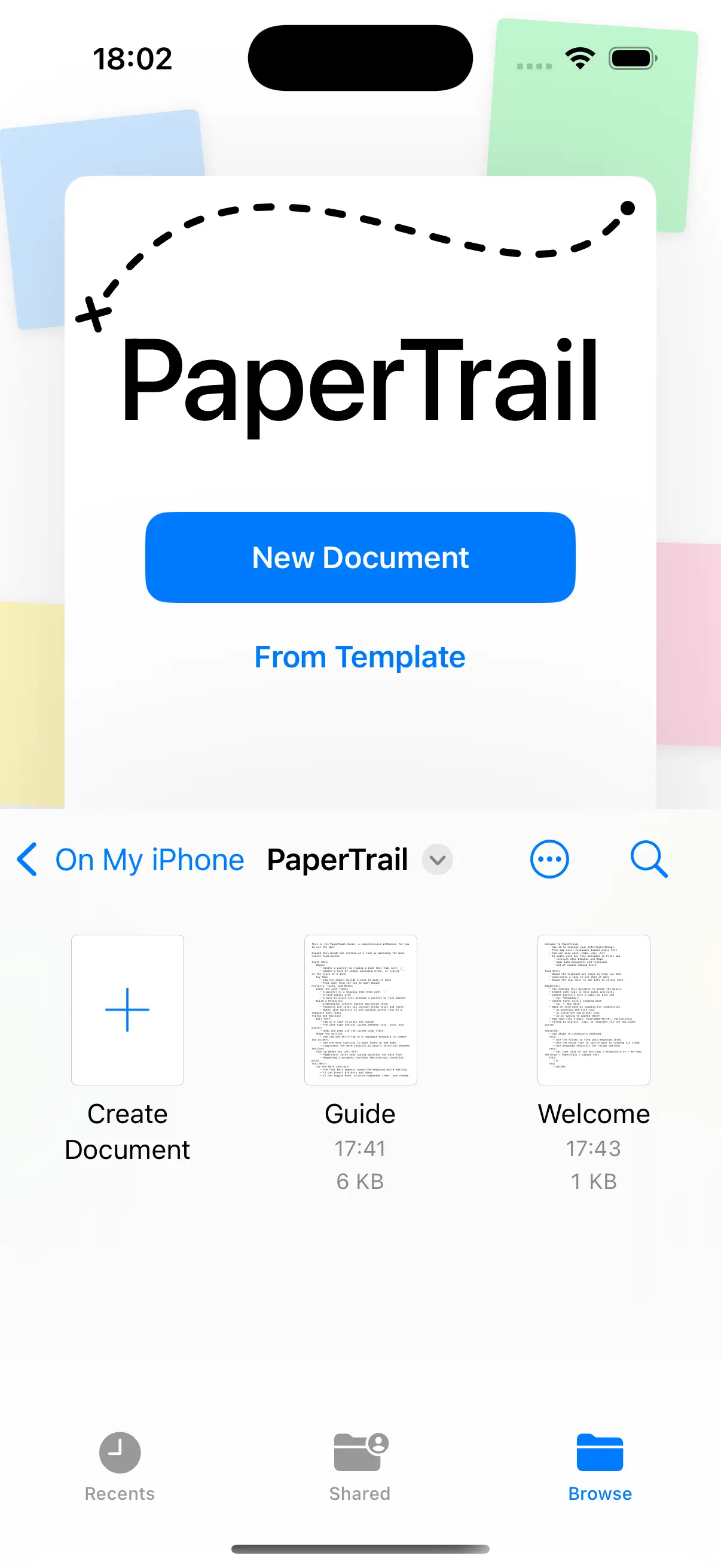
- Launch scene (iOS 18+) with New Document and From Template buttons over an animated decorative background
- Animated launcher so you never get bored of how it looks
- What’s New sheet for new installs and updates
- New! A one-time note the first time a Bike or OPML file is opened, explaining it’s edited as TaskPaper and saved back in its original format
- New! Reset Onboarding Alerts command re-shows the one-time notices and the What’s New sheet
Benchmarks
Benchmarks on iPhone 16 Pro, running iOS 18:
- Real keystrokes on a 3,300-line file process in about 3.4ms in release builds—a small fraction of a 120Hz frame
- Rapid typing across large real-world files (3,000–5,600 lines) stays around 2–4.5ms per keystroke
- Structural edits on a top-heavy 3,300-line file complete in about 4.5ms unfolded and about 85ms folded
- Date comparison search on a 5,600-line fixture completes in about 12ms
- Aggregate-heavy documents recompute 50
@cost(sum=...)parents in about 25ms - Visible-range styling is windowed, so cost stays flat regardless of document length—about 5ms for a 5,000-line file, roughly 25x faster than full-document styling
- Tag and boolean search stay single-digit milliseconds even on 5,000+ line documents; semantic
~search is the only query reaching the tens of ms, by design - Fold indicators and text styling are cached and windowed so large, top-heavy and deeply-nested documents scroll, fold, and type without freezes
- 120Hz ProMotion screen refresh supported
Optimised
- Built with Swift and TextKit 2
- Only 1.19 MB app download size
- Less than 50 MB base memory footprint
- Quick to launch and built to stay in memory
How It Compares
Here’s how this app compares to other similar apps.
| PaperTrail | Taskmator | TaskPaper | |
|---|---|---|---|
| Platform | iOS | iOS | macOS |
| Native app | ✓ | – | Hybrid |
| Technology | Swift | Web | Swift+Web |
| TaskPaper format | ✓ | ✓ | ✓ |
| Search query language | ✓ | – | ✓ |
| Morphological search | ✓ | – | – |
| Semantic search | ✓ | – | – |
| Saved searches | ✓ | ✓ | ✓ |
| Node focus (Hoist) | ✓ | – | ✓ |
| Folding of projects | ✓ | – | ✓ |
| Fold to depth level | ✓ | – | ✓ |
| Persist fold state | ✓ | – | ✓ |
| Colour items | ✓ | – | – |
| Progress tracking | ✓ | – | – |
| Cost/numeric tracking | ✓ | – | – |
| Natural date parsing | ✓ | – | ✓ |
| Reminders sync | ✓ | ✓ | – |
| Tag filtering | ✓ | ✓ | ✓ |
| Edit while filtered | ✓ | ✓ | ✓ |
| Sidebar inspector | ✓ | – | ✓ |
| Keyboard shortcuts | ✓ | – | ✓ |
| Command palette | ✓ | – | ✓ |
| Edge swipe gestures | ✓ | – | – |
| Document templates | ✓ | – | – |
| HTML export | ✓ | – | – |
| OPML import/export | ✓ | – | – |
| Bike import/export | ✓ | – | – |
| Bike round-trip (ids, formatting) | ✓ | – | – |
| Bike row links | ✓ | – | – |
| Tag autocomplete | ✓ | – | – |
| Files support | ✓ | ✓ | – |
| Cloud sync | ✓ | ✓ | ✓ |
| Theming | ✓ | ✓ | ✓ |
| Font choice | ✓ | ✓ | – |
| Dark mode | ✓ | ✓ | ✓ |
| App size | 1.19 MB | ~75 MB | ~15 MB |
With a hardware keyboard attached, PaperTrail supports 50+ shortcuts:
⌘F: Search (scoped to current project)⇧⌘F: Search all projects⌥⌘F: Find & Replace⌘G/⇧⌘G: Find next / previous⌘R: Refresh editor search⌘J: Jump to selection⌘Esc: End search⇧⌘H: View All / Home⌥⌘S: Hide sidebar⌃⌘S: Show sidebar (all sections expanded)⌘D: Toggle done⌘T: Tag picker⌃⌘T: Toggle line type⇧⌘A: Archive done items⌥⇧⌘A: Archive done items in current branch only⇧⌘D: Duplicate lines⌘#: Move to Project⌥⌘G: Group Lines⌘.: Toggle fold⌘9/⌘0: Collapse / Expand current item⌥⌘9/⌥⌘0: Collapse / Expand current item completely⌃⌘9/⌃⌘0(or⇧⌘9/⇧⌘0): Collapse / Expand one level at a time⌥⇧⌘9/⌥⇧⌘0: Collapse / Expand all completely⌃⌘←/⌃⌘→: Outdent / Indent line⌃⌥⌘←/⌃⌥⌘→: Outdent / Indent current branch⌃⌘↑/⌃⌘↓: Move lines up / down⌃⌥⌘↑/⌃⌥⌘↓: Move current branch up / down⇧⌘←/⇧⌘→: Outdent / Indent selection⇧⌘↑/⇧⌘↓: Move selection up / down⌃W/⌃S/⇧⌘L: Select word / sentence / paragraph⇧⌘B: Select branch⌥⌘↑/⌥⌘↓: Expand / Contract selection⌘A: Select all⌘Y: Toggle@today⌃⌥⌘K: Remove tags on current line or selection⌘Return/⌥Return: New Task⌃⌘Return: New Note⌥⌘Return: New Project⌃Return: Newline below (preserves indent)⌃⌥Return: Newline above (preserves indent)⌃⇧Return: Newline without indentTab/⇧Tab: Indent / Outdent⌃⌥D/T/A: Due date /@today/@alarm⌃⌥↑/⌃⌥↓:@high/@low⌥⌘X: Clear all tags⇧⌘P: Choose Command palette⌘P: Go to Anything palette⌥⌘P: Go to Project⌃⌘P: Go to Search
PaperTrail uses the plain-text TaskPaper format created by Hog Bay Software. Learn the format, tags, folding, and the full search query language in the TaskPaper Guide (archived copy).
This is most likely due to the Apple Intelligence Writing Tools feature, which appears from time to time in the keyboard area, causes the tool belt to be repositioned. You can get around this by turning off Writing Tools: Screen Time > Content & Privacy Restrictions > Intelligence & Siri > Writing Tools > Don’t Allow
The strip of typing suggestions above the keyboard can crowd the editor and push the tool belt around. Two ways to tame it:
- Hide it temporarily: swipe the suggestion bar to the side and it shrinks into a small square showing the current language (
EN). Swipe it back out when you want the suggestions again. - Remove it for good: Settings > General > Keyboard, then turn off Predictive and Shortcuts. The bar disappears over both the on-screen software keyboard and a hardware or Bluetooth keyboard, and Apple Intelligence stays on.
- Hide it temporarily: swipe the suggestion bar to the side and it shrinks into a small square showing the current language (
Yes (woo!) and no (boo!). Yes, you can do this through Shortcuts, as PaperTrail provides several features to Shortcuts and one of them is this option. Create a Shortcuts Widget and put PaperTrail’s Open Recent in there and then you can assign to your home screen, the action button, etc. And no, the app sadly can’t open directly to the most recent doc because of Apple limitations on Document Group apps.
What keyboard shortcuts are available?
Where can I learn more about the TaskPaper format and search syntax?
On iPad the tool belt keeps jumping up and down?
On iPad the predictive text bar covers my text?
Can I start PaperTrail with the same document every time?
PaperTrail is championed by Hog Bay Software, the creators of TaskPaper